Event operations management involves coordinating many details behind every event, including budgets, vendor contracts, venue approvals, staff schedules, guest lists, marketing content and final reports for the client.
For most event teams, that work is spread across a messy stack. A spreadsheet for the budget, a chat group for the field team, email threads for approvals, a shared drive for files and a separate tool for tasks. Every event starts with the same question: where is the latest version?
Choosing the right project management tools can help event teams keep their tasks, files and responsibilities organized.
This guide shows how to bring event operations into one workspace, step by step, and how Taskona helps event teams do it under their own brand.
Why Scattered Tools Hurt Event Teams
Event work has three features that make tool sprawl expensive:
- Hard deadlines. The event date does not move. A delayed approval or a missed task shows up on the day, in front of the client.
- Many hands. Planners, vendors, field staff, finance and the client all touch the same event.
- Repeated work. Every event repeats the same forms, checklists and reports with small changes.
When these live in five different places, teams lose time on follow-ups, files go missing, and the context of each event sits in one person’s head. Effective event operations management helps teams keep these details organized and ensures everyone stays updated throughout the process.
Step 1: Give Every Event Its Own Project
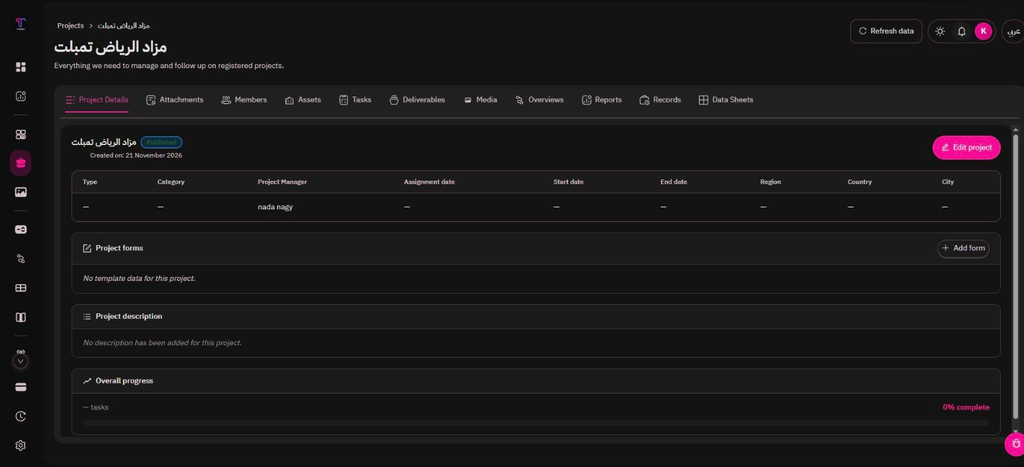
Start by treating each event as a project with a clear owner. Put the members, files, assets and tasks for that event in one place.
In Taskona, each project holds its members, assets, attachments and tasks together. Anyone joining the event mid-way sees the full picture in one view.
Step 2: Turn Recurring Work Into Templates
Most event checklists repeat: venue booking, vendor confirmation, staffing, setup, run-of-show and wrap-up. Build them once as templates and reuse them for every event.
Taskona supports reusable form templates and visual workflow templates. A new event starts with the right forms and steps already in place, instead of a blank page.
Step 3: Move Approvals Out of Email
Budget sign-offs, vendor contracts and design approvals often get stuck in inboxes. Move them into a visible approval workflow where everyone can see what is waiting and on whom.
With Taskona’s visual workflow templates, a request moves from submission to review to approval inside the workspace. Every step is recorded in the activity log, so you always know who approved what.
Step 4: Keep Your Data in Structured Tables
Guest lists, vendor lists, inventory and staff rosters usually start in Excel. Keep the spreadsheet feel, but connect the data to the event.
Taskona’s data tables offer views, filters and Excel import. You can bring your existing lists in and filter them by event, status or owner.
Step 5: Control Who Sees What
Events involve people inside and outside your company. Vendors should see their tasks, not your budget. Clients should see progress, not internal notes.
Taskona’s custom roles and permissions catalog let you set exactly what each person can see and edit.
Step 6: Capture What Your Team Learns
Every event teaches something: a reliable vendor, a venue rule, a better setup order. Without a home for that knowledge, it leaves when a team member does.
Taskona’s built-in knowledge base lets your team publish and search internal guides, so the next event starts smarter than the last.
Step 7: Close Every Event With a Report
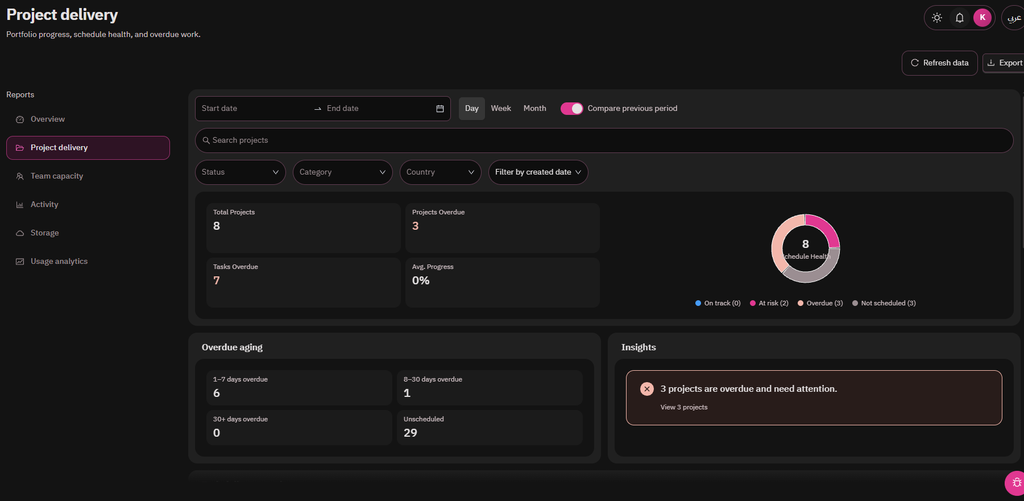
A clear handover and a final report protect the relationship with your client and help your team improve.
Taskona includes team reports and handover reports, plus group notifications to keep everyone updated as the event moves forward.
Why a Branded Workspace Matters for Event Companies
Event companies sell experience. When clients log into a portal to follow their event, that portal should carry your brand, not a software vendor’s.
Taskona gives each organization its own workspace with its own logo, colors, font, login image and interface text. The portal your clients see becomes part of your service. Each organization also runs in its own isolated workspace, so your data stays separate.
For teams in the Middle East, Taskona’s full Arabic and English interface, with right-to-left support, means local staff, international partners and clients can all work comfortably in the same space.
Beyond Events: One Platform for All Your Projects
Taskona is a project and team management platform first. Event operations are one of Taskona’s ready-made solutions, alongside a ready-made auctions solution. The same workspace also runs your internal projects, client work and day-to-day team tasks.
That means one platform for the whole company, not a separate tool for each department.
Event Operations Checklist
| Stage | What to set up | Taskona feature |
| Planning | One project per event, with an owner | Projects and tasks |
| Preparation | Reusable checklists and forms | Form and workflow templates |
| Approvals | Budget, vendor and design sign-offs | Visual approval workflows |
| Data | Guests, vendors, staff, inventory | Data tables with Excel import |
| Access | Internal, vendor and client roles | Custom roles and permissions |
| Knowledge | Vendor notes, venue rules, guides | Knowledge base |
| Close-out | Handover and final report | Team and handover reports |
Conclusion
Event teams do not need more tools. They need one place where every event’s tasks, approvals, data and knowledge live together. A branded workspace adds a professional layer your clients will notice.
Taskona brings all of this into one platform, in Arabic and English, under your own brand.
Run your next event from one workspace. Start free on Taskona.io and start your free trial.
FAQ
What is event operations management?
It is the planning, coordination and control of all the work behind an event, from budgets and vendors to staffing, approvals and reporting.
What should event management software include?
At minimum: project and task tracking, approval workflows, structured data, role-based access and reporting.
Can Taskona be used for projects other than events?
Yes. Taskona is a general project and team management platform. Events and auctions are ready-made solutions inside it.
Does Taskona work in Arabic?
Yes. The full interface works in Arabic and English, with right-to-left support.